
Ice Breakers That Actually Work
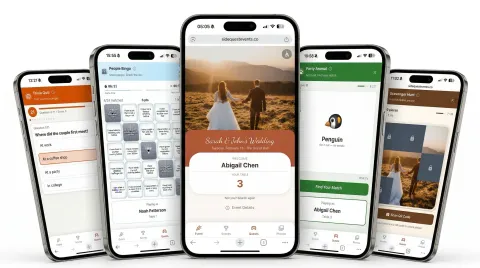
People Bingo matches colleagues on things they didn't know they had in common. Trivia sparks friendly competition. Scavenger Hunts get people exploring together. The best icebreakers don't feel like icebreakers.
Everything in One QR Code
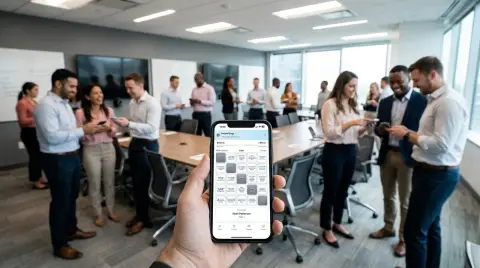
Share a QR code in the room or drop the link in Slack, Teams, or Zoom. Everyone lands on your event's own page — the agenda, the activities, and the scoreboard. Works remotely and in-person.
The Moment Everyone Talks About
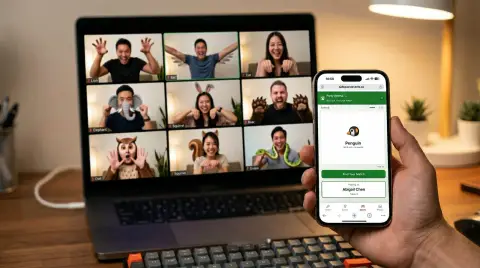
Party Animal gives everyone a secret animal to act out — sounds encouraged, just no words. It's charades on steroids. The room erupts, inside jokes are born, and your teammates go too hard on the penguin walk.
What's Behind the QR Code
One QR code, from the first RSVP to the last photo.
 FROM THE BLOG
5-Minute Ice Breakers for Your Next Virtual Team Meeting
Five quick ice breakers you can run at the start of any video call — with zero setup.
Your Guest Hub Is Live in 30 Seconds.
Get your event page up and running in seconds
Create a Free Account
Sign up with Google, Facebook, or email — one tap and you're in
Fill In Your Details
Add your agenda, joining details, and FAQs, then pick your colors and fonts
Share One QR Code
QR code in the room, link for virtual — everyone scans or clicks and they're in
Built for Every Team Event
From the conference stage to the call
Offsites & Retreats
Skip the trust falls. Ice breakers that get people actually talking.
Remote & Virtual Teams
Give distributed teams something fun to do together on the call.
New Hire Onboarding
Help new members learn names, faces, and fun facts fast.
Meetings & All-Hands
Turn the last 10 minutes into the part everyone remembers.
Holiday & Office Parties
The office party people actually talk about the next day.
Cross-Team Mixers
Break department silos. Get people connecting in minutes.
Start for Free
All features included. Upgrade for large events.
Free
No credit card required
$0
Up to 100 participants
Perfect for meetings, onboarding, and offsites
Large Event Upgrade
One-time payment
$99
Unlimited participants
For conferences and large team events
Questions & Answers
SideQuest is built for exactly this. People Bingo gets remote team members discovering things they have in common. Live Trivia creates real-time competition on the call. Party Animal has everyone acting out animals on camera — it's hilarious. Just drop the link in the chat and everyone joins from their own device. No app download needed.
Share a QR code (for in-person) or paste a link (for virtual) — that's it. No app download, no account needed for participants. People open it on their phone or laptop, enter their name, and they're playing in seconds. Works on any device with a browser.
Everything behind one QR code: your own event page (agenda, joining details, FAQs), RSVP collection, group chat with host announcements, a shared photo and video album with a full-screen slideshow, a live scoreboard, and all five ice breakers.
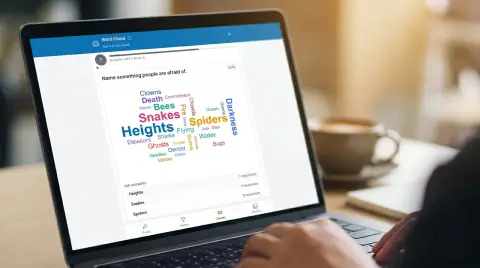
Every plan includes all ice breakers: People Bingo (colleagues submit five facts about themselves, then work out whose facts fill their card), Live Trivia (real-time quiz rounds with instant scoring), Scavenger Hunts (QR-based exploration challenges around your office or venue), Party Animal (act out a secret animal — sounds and movements encouraged, just no words), and Word Cloud (live group answers). You can run multiple ice breakers at the same event.
Yes — both. For in-person, display a QR code and people scan to join. For virtual, share the link in the chat. Everyone plays together on the same leaderboard.
About 30 seconds. Your first event is created automatically with ice breakers ready to go — you get a QR code and link to share. Want to customize questions or add your own? That takes a few minutes more, but it is optional. No facilitator needed, no slide decks, no special software to install.
Yes — SideQuest is completely free for up to 100 participants, with all ice breakers and features included. No credit card required. That covers most team meetings, small offsites, and pilot runs. For larger events (100+ people), you can upgrade for $99 (one-time).
Everyone needs an internet connection (WiFi or mobile data) on their phone or laptop. Most offices and venues have WiFi, and cellular data works fine too. The ice breakers are lightweight and work well even on slower connections.
Yes! Assign people to teams (departments, tables, squads — whatever you want) and their individual scores roll up to a team leaderboard. Great for cross-department bonding, sprint retro celebrations, or friendly rivalries between engineering and marketing.
Write your own event info sections (agenda, joining details, FAQs), set your colors and fonts, then write trivia questions about your company history or inside jokes and scavenger hunt clues for your specific venue or office. People Bingo needs no setup at all — the cards build themselves from the facts your team submits.
Team meetings, offsites, onboarding weeks, virtual happy hours, all-hands meetings, company kickoffs, holiday parties, conferences, lunch & learns, and cross-team mixers. Anywhere you want people to connect instead of just sit there.
Privacy by default. All event data — including photos, names, and scores — is automatically deleted 180 days after your event. Download anything you want to keep before then. We don't sell data or use it for advertising. No tracking cookies.

Your Team Will Thank You
Check out SideQuest for parties, weddings, and baby showers. Visit our blog for event ideas.